
OSRS Shooting Star Tracker: Live Locations, Tiers & Timers
Quick Decision Snapshot
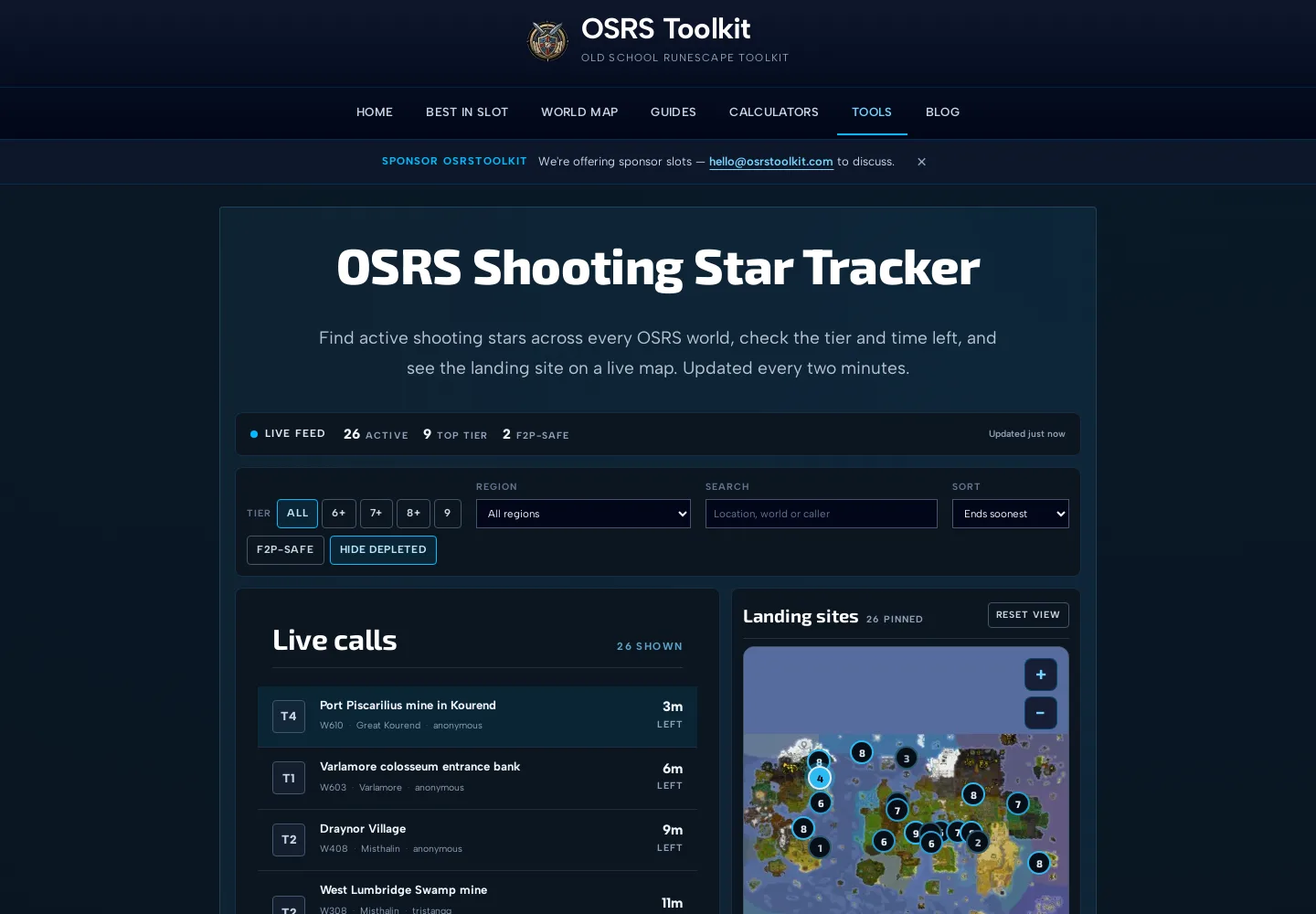
Track every active OSRS shooting star by world, tier and time left. See landing sites on a live map, filter F2P-safe stars, and copy the world before you hop.
- Track every active OSRS shooting star by world, tier and time left
- See landing sites on a live map, filter F2P-safe stars, and copy the world before you hop.
Shooting stars are one of the best AFK Mining methods in Old School RuneScape. The problem is not mining them, it is finding one before it depletes. The new OSRSToolkit Shooting Star Tracker shows every active call at a glance.
The tracker pulls the latest calls from the Star Miners community, shows the tier and time left, and pins the landing site on an interactive map. It refreshes every two minutes and works on desktop and mobile.
What the tracker does
- Shows every active star call with world, tier, caller and time left.
- Pins the landing site on the same world map used across OSRSToolkit.
- Filters to F2P-safe stars, so free players do not hop to an unreachable site.
- Copies the world number and shows the nearest teleports.
No login, no download, and no plugin required. Open the page before a Mining session and leave it on a second screen.
How to use the tracker
- Scan the calls. The list sorts by time left by default. The star that will disappear first is at the top. Switch to Highest tier when you want the longest run.
- Pick a world and check the map. Click a call to pin the landing site. The detail panel shows the world, tier, caller and nearest teleports.
- Copy the world and hop. Press Copy world, hop in game, and bring a pickaxe. Tier x 10 is the Mining level for that layer.
- Mine one layer at a time. Each layer takes seven minutes while at least one player is mining. Stay for the full star if the world is quiet.
Why the F2P-safe filter matters
A free-to-play world can still have a star in a members area. The world badge alone does not tell you whether a free account can reach the star. F2P-safe fixes that by requiring both a free world and a free-area landing site.
Turn it on if you are on a free account. Leave it off if you are a member and want every call.
Where the data comes from
Calls come from the Star Miners community. Scouts use the Star Miners RuneLite plugin to report a star's world, tier and landing site. The plugin posts the call to the community feed, and the feed keeps the latest call per world.
This is player-reported data, not Jagex data. A call can be late, wrong, or already depleted. Use it as a head start, then confirm the star in game.
How accurate is the timer?
A star loses one tier every seven minutes while at least one player mines it. The tracker estimates the end time from the last called tier and the time of the call. The OSRS Wiki documents the same layer timing.
A tier 8 call made four minutes ago has about 52 minutes left. That is 8 x 7 = 56 minutes of star life, minus the four minutes since the call.
The estimate is only as good as the last call. If nobody updates the tier, the real star can be lower than the tracker shows. If a call is more than a few minutes old, check the star before you commit to a long run.
Tips for a better star run
- Use a telescope in your POH to find the next landing window before it opens.
- Prioritise tier 8 and 9 stars when a world is quiet. They last longer and give more stardust.
- Check the Wilderness tag before you hop. Bank first and travel light.
- Use the nearest teleport in the detail panel, then run the last few seconds on foot.
- Call the star in the Star Miners Discord if you find one. More calls make the tracker better for everyone.
FAQ
Is the OSRSToolkit shooting star tracker free?
Yes. The tracker is free, needs no account, and works in your browser on desktop and mobile.
How often does the tracker update?
It refreshes every two minutes. The timer counts down continuously between updates.
Can I use the tracker on a free-to-play account?
Yes. Turn on F2P-safe to show only stars on free worlds with free-area landing sites.
Why is a star missing from the map?
The map needs a known landing site. If a call uses an unrecognised name, it still appears in the list but has no pin.
Does OSRSToolkit generate the star calls?
No. Calls come from the Star Miners community. OSRSToolkit reads the public feed, checks the landing sites against the OSRS Wiki, and renders the map.
Find your next star
Open the live tracker, pick a world, and copy the number before you hop. If you want the full Mining route after the star, use the Mining guide and the Mining calculator.
Ready to apply what you learned?
Plug your stats into our free OSRS calculators to see exact XP, GP costs, and time estimates before you commit to a training method.
Sources & methodology
XP rates, requirements, and drop data in this guide are cross-checked against the OSRS Wiki and verified against in-game behaviour. Grand Exchange prices move daily, so treat GP/hr figures as estimates and confirm current prices with the OSRS Wiki price tracker before committing to a method.
Darren started playing the original RuneScape 2 back in the day and came back when Old School RuneScape launched. He's played on and off over the years and built OSRSToolkit to give players a single place to find reliable tools, calculators, and guides — all informed by real in-game experience.